Wednesday, 18 May 2016

Analysis

When I had started my work, I wanted to do a Primal themed project which had humans and animals in it. I also, wanted to be able to develop my Photoshop skills to help me do my final concept piece, I will do this by looking up tutorials, asking my peers for tips and by also asking my tutors. I have developed my Photoshop skills a lot over the duration of the course, like learning how to add more colour to my art pieces to give them more depth, which I had learnt from my peers and tutors. A lot of the colours I had used before didn't really match or blend with each other, but after learning how to blend them together and which colours to pick and use, I had a better outcome, as the art pieces I had drew had a lot more detail and techniques used in them.

Shiam Wilcox - Artist Research

This is my tutor and they had showed me how to do a lot of work in the style of the way they do their work. This has helped me a lot to present my work, and how to do a lot of the techniques on Photoshop. One of the pieces of work that my tutor had showed me to do was the fur experimentation, they had showed me how to make the fur pattern by changing the brush presets to custom made ones, which I had made and then change the brush size, hardness and flow to make the brush able to imitate the fur patters. And also, I learnt how to add colours in and blend them to suit a fur pattern properly, which had helped to add a lot of detail to the art piece that I was doing, as it brought out a lot of colour and the colours I had used were also blended into the fur.

Composition - Research

 
While I was doing my Photoshop design I was thinking about how I should compose my Concept Art to make it guide the reader to my characters. I had looked at the Golden Spiral to help me decide if I wanted to have this or Rule of Thirds. The Golden Spiral is a good composition to have as I could gradually expand on the detail, and have the main part of the art in the outer spiral. This could be very useful as I could have, in my final piece, the 2 characters in the concept art walking forward while there is animals in the background. Where as the Rule of Thirds has the main action in the centre of the image, and I think this could equally be useful as I could have the centre of the image having the main action or point of the image then the top and bottom third showing less detail but still guiding the viewers to the centre.


These are the 3 forms that are usually used in a image, there is the Dominant Form, Sub Dominant Form and the Subordinate Form. The Dominant Form usually has a large structure and mass and is the first thing a viewers eye is drawn to. The Dominant Form is mostly placed of to the side and never in the middle as it is meant to guide the viewer to the Subordinate Form and not just be the only thing a viewer would look at. The Sub Dominant Form is used to balance the Dominant Form, as there is something there of comparison and is usually smaller than the Dominant Form. It would typically be the next thing a viewer looks to after looking at the Dominant Form


New Project Proposal


This is my new Project Proposal that I have done, it has a lot more information on what I am doing in my project. Also, it has what I am going to do for my evaluation in my project.

Tuesday, 17 May 2016

Perspective - Research


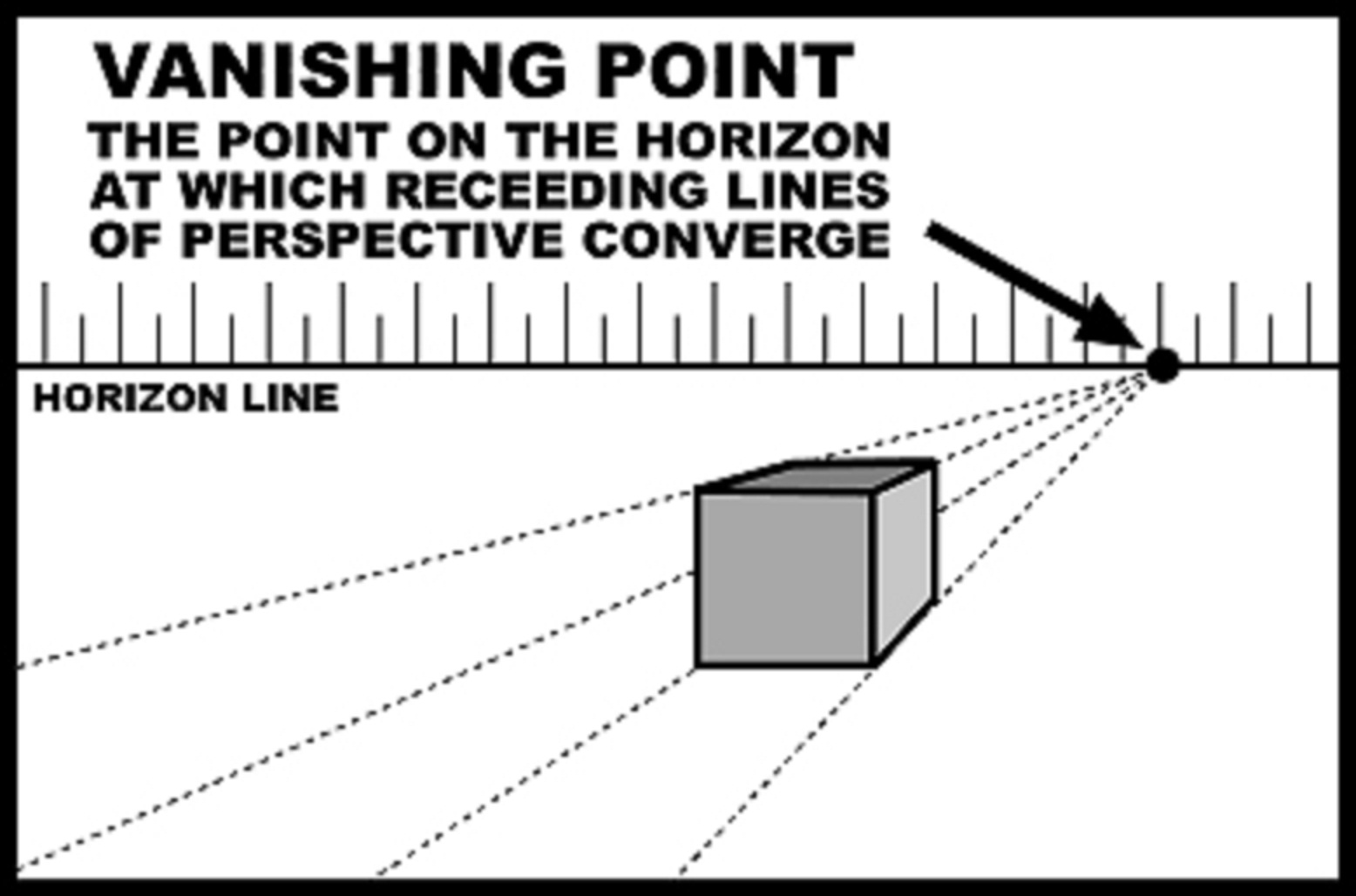
While doing my final concept piece, I had considered what type of perspective I wanted to do my piece from. I had done some research on the different points of perspective that you can do and took them into consideration. The drawing with all the types of perspectives you could have from the centre point was very useful in my work as it had helped me to see what I could do if I wanted to expand from the centre of the image. The Vanishing Point, was very useful as this was the type of perspective that I had wanted to have in my work. I wanted to have my characters walking along a path and the start of the path, vanishing off into the distance. The Three Point Perspective, has three different vanishing points which would be useful but, not exactly what I wanted as I wouldn't be able to get a lot of detail on the top / bottom half of what I am doing depending on if, I was doing Bird's Eye or Worm's Eye View. The Two Point Perspective is useful as it has two vanishing points and it can show the type of detail that I wanted to convey out of my work. The Single Point Perspective is the type of perspective that I think is also very useful, as I can include the environment as well as the two characters and they will be clearly visible.

I have decided, that the type of perspective that I want to use is going to be the Single Point Perspective, as this one has one vanishing point and in my opinion I think it is overall better than the other perspective, but they still are have given me some though on how I should position the centre focus and the vanishing point.


Monday, 16 May 2016

Mudbox - Software Research

Over the past few weeks I have been using Mudbox to get a basic male character done on it, to help me visualise what the character should look like. I had used YouTube to help me do some of the sculpting on the head, especially a video called ... which had helped me to see how I could form a male face and build up the detail gradually on it. Also, I had used this picture (https://cdn0.vox-cdn.com/uploads/chorus_asset/file/2534690/uncharted_4_drake_smile.0.jpg) of Nathan Drake from Uncharted 4 to help me see the male facial structure as well as I wanted to have a reference that I could use to refer to. This had helped me a lot to see the different parts of muscle in the face and how everything should be structured on the face, neck and head. Also, I had used another tutorial ... to see how to use the tools like waxing to build up the facial structure of the model that I was making, this was very useful as it had helped me to add more detail, and also I had learnt how to use stamps on brushes and use them to also make detail.

But, some of the time I had problems which I had to fix either myself, with the help of my tutors and peers or by searching online for example. the layers on Mudbox kept on locking themselves and would not unlock, so to overcome this problem, I had to save the document and quit the application, then reopen it and the problem was fixed. Another problem was that I had done a lot of my work and didn't save as often, sometimes the application would close itself and I wouldn't have saved my work. I had looked online to see why this would happen and it had said that the application does this when too many things are going on at once. So, to help prevent a lot of progress from being wiped I had made sure I saved it every so often